
Performance Max campaign updates

Significant changes were announced to Performance Max campaigns at Google’s last event. If you want to know more, keep on reading.

Google Marketing Live 2022 gave us a lot to talk about. Among other important updates, the company announced new optimizations, insights, and in-store goals for Performance Max campaigns. In this post, we’ll explain everything you need to know about these additions

Optimization score

Google is now adding recommendations for optimizing the Google Ads platform, placing a new tip section in their most automated campaign type. This provides advertisers with helpful information about how campaigns are performing, followed by advice on a potential solution.

Additional insights

As we mentioned in our previous article, advertisers will get more insight into what is driving your ads’ performance, including consumer, audience, and auction information. Phrases such as “x is performing better compared to last week” will be displayed on your insights tab, followed by a graph with trend details. 

Experimentation tools

This new experimentation tool takes existing campaigns and compares them to a potential version of Performance Max, showing how much lift could be seen if launched. As it is a model, advertisers can’t control this experiment, so it only includes a potential visual. You can’t work with it and you can’t experiment with further changes. 

So beware, you might want to measure additional volume with your own means to see if it actually is incremental.

Do you think this new experimentation tool will be a good aid? Let us know in the comments below.

Further access with Search Ads 360

Lastly, those advertisers who use SA360 will now have access to manage Performance Max campaigns. Also, if you prefer the Google Ads app, these new updates might work in your favor. Google is cooking some operative changes to the app so that Performance Max campaigns can be managed from the comfort of your device.

Our Take

All of these additions can give advertisers more options to manage their campaigns, so, great news! Even though Google sticks with the automation mentality, we are grateful that they decided to add tools that provide further information since this campaign type is already very self-regulated to begin with. 

As expected, we will continue to review these changes and we’ll let you know if any news is worth sharing. Stay tuned!

About Quantikal

Quantikal is a data-driven performance marketing agency based in Buenos Aires, Argentina. We help clients scale their business through profitable digital ad spending by constantly obsessing over clients’ key metrics. Quantikal’s experience working in diverse online companies in marketing roles including media buying allows us to provide solutions in the ever-demanding increase of marketing performance, doing more with less thus becoming a strategic partner.
Google’s Universal Analytics is discontinued for 2023

Here’s all you need to know about Google Analytics 4 and why it’s relevant to your business

Universal Analytics, known as Google Analytics 3, is saying goodbye for 2023. We want to inform you in advance so you can adjust to Google Analytics 4 as quickly as possible.

The name “Universal Analytics”, aka GA3, will cease to exist. Now, advertisers will use Google Analytics 4 as their new data platform.

Advertisers will have to export data from UA to GA4 through Data Studio, installing GA4 on their website to access year-to-date information before UA is gone for good. 

Did you install GA4 already? Do you think this will be a hassle for most advertisers? Let us know in the comments below.

What is different about GA4?

UA is a session-based model, as opposed to GA4 which uses an event-based version that welcomes more data for your analytics platform.

The event parameters are now bigger, from four per event in UA to 25 per event in GA4. Also, GA4 can have 500 named events for those you set up, so the limit does not exist for default events.

In GA4, you will notice that the bounce rate is gone and replaced with “Engaged Sessions”, which logs data if the user stays on your website for more than 10 seconds, if your website has more than 2 page views, or if the user triggers a conversion. 

However, not all sections in GA4 have the ability to change the time period. For example, while running a custom report, you won’t be able to change the time frame in that specific report. To be able to do this, advertisers will have to go back to the main Report menu and change the time logged there to see the changes reflected in your specific report.

Also, GA4 does not allow advertisers to click on reports and see the Ad Group. The platform will only show you all Ad Groups, with no way of seeing just a specific campaign. 

Google now includes a tool to move your conversions from UA to GA4 if you have goals set up in UA. What happens if you don’t? You will have to tackle Google Tag Manager to push your conversion data.

Our Take

We notice that there are some limitations in GA4, specially if you have a hard time getting used to change. In order to modernize its platform, Google focused on updating the display to a less easy-to-use version. This doesn’t necessarily mean that GA4 is more complex, but we do see that settings are more hidden or harder to find. 

We suggest advertisers practice and learn about GA4’s settings before UA is terminated so that you are ready to dive in without tackling the learning process simultaneously.

As expected, we will evaluate GA4’s performance and let you know if any changes are adjusted. Stay tuned!

About Quantikal

Quantikal is a data-driven performance marketing agency based in Buenos Aires, Argentina. We help clients scale their business through profitable digital ad spending by constantly obsessing over clients’ key metrics. Quantikal’s experience working in diverse online companies in marketing roles including media buying allows us to provide solutions in the ever-demanding increase of marketing performance, doing more with less thus becoming a strategic partner.

Google removes Expanded Text ads

Users will no longer be able to create expanded text ads. Keep on reading to find out more.

By the end of June 2022, Google will end Expanded Text ads and no further creation or editing is permitted. After June, users will only have access to modifying Responsive Search Ads (RSAs) in Search campaigns.

Why? Google wants to simplify the creation process of Search ads and drive performance with automation tools. RSAs use machine learning to determine which ads are relevant to each user so that they can be placed up front, so this is “better” for reaching people in need of your product.

Expanded Text ads already created will continue running, with the ability to pause and relaunch, but no new ones will be created. 

Are you currently using Expanded Text ads? How will you adjust to this new change? Let us know in the comments below.

Google recommends advertisers repurpose well-performing text ads into RSAs and improve their ad strength. Using RSAs, you can pin headlines in positions where you ensure they always show, use variations to test different ads and review cross-campaign reporting based on performance.

Also, Google recommends the use of Smart Bidding for broad keywords in RSAs, which can allow marketers to optimize bids.

Our Take

We know that RSAs have been around for a while, -since May 2018 to be exact-. The fact that Expanded Text ads help advertisers have clarity and control over the order in which titles are shown is a valuable feature, and here is where RSAs have their setbacks. 

When pinning titles in RSAs, Google “punishes” advertisers by lowering the ad strength. Crazy, right? What Google doesn’t want you to do is transform RSAs into something similar to Expanded Text ads, so they strip advertisers’ liberty to order their own ads. Google‘s machine learning wants to have total control of your ad display, without any external intervention. 

It’s been clear for a while now that Expanded Text ads were being butchered and RSAs were winning over Google’s heart. Adding RSAs was not the problem since more options and more ways in which advertisers can place their ads are always welcome. Though it would have been great to see them coexist, Google’s flexibility was not ready to bend. 

So, now that Expanded Text ads are saying their goodbyes: why do advertisers have to lose the ability to build more specific ads by ordering titles as they please?

It would have been better to test ads with actual metrics, such as CTR or expected CTR beforehand. Instead, marketers are bound to trust Google’s machine learning abilities because the alternative is to be punished, and that doesn’t sound right to us. 

Here’s the thing: if Google added RSAs so that advertisers could have new options, shouldn’t there actually be an option (without any limitations)?

As always, Quantikal will test possible alternatives and keep you in the loop of any new changes. Stay tuned!

About Quantikal

Quantikal is a data-driven performance marketing agency based in Buenos Aires, Argentina. We help clients scale their business through profitable digital ad spending by constantly obsessing over clients’ key metrics. Quantikal’s experience working in diverse online companies in marketing roles including media buying allows us to provide solutions in the ever-demanding increase of marketing performance, doing more with less thus becoming a strategic partner.

Google’s automated discounts as a shopping feature

Want to know more about this new pricing tool? Keep on reading.

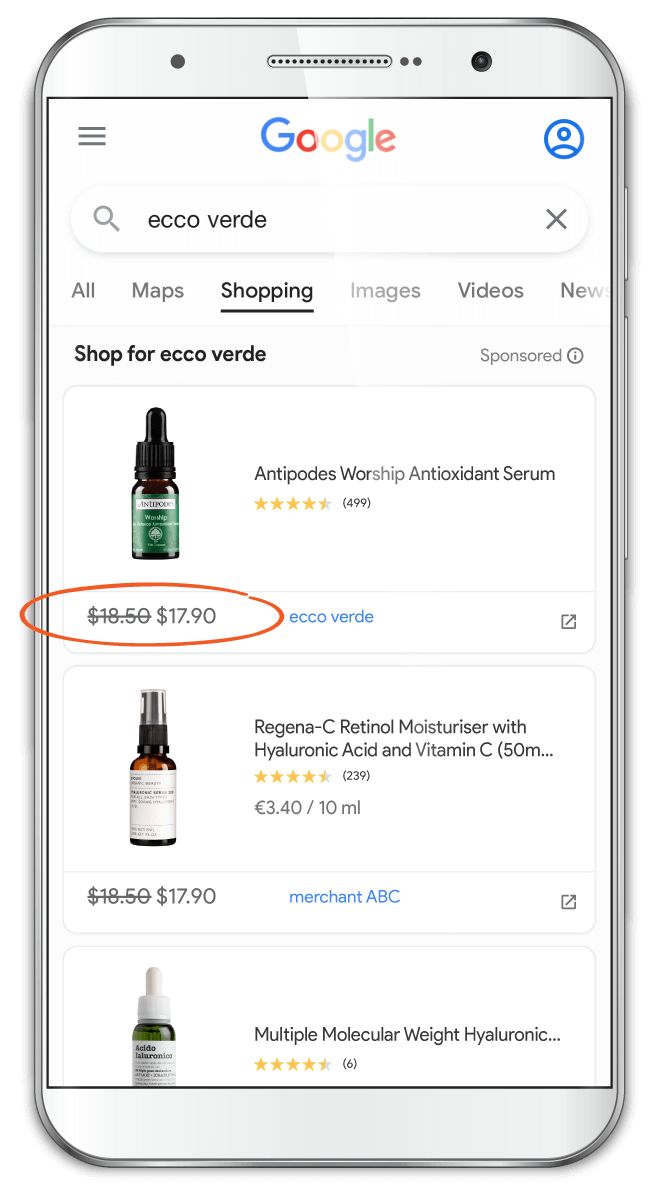
Google Ads automated discounts is a new pricing tool using real-time data and artificial intelligence to attract customers into sales.

What does this mean? The optimized price is displayed in your ads. When users click on it, they are redirected to your page showing the actual price available (this resembles to plane tickets, for example). 

How do automated discounts work?

Google’s AI is in charge of adjusting the price of ads after analyzing large amounts of data. Once you set the minimum and maximum price range allowed, Google’s system considers price elasticity, trends, and market prices to determine optimized discounts.

Would you implement it in your business? Let us know in the comments below. 

How to set it up

  1. Implement conversion tracking: this can show you what happens when a user interacts with your ad
  2. Set minimum and maximum sell price
  3. Determine the cost: you can either set it yourself for items you want the automatic discount to work with or you can let Google’s AI determine it for you
  4. Integrate pricing controls on your website

Our Take

Google’s automated discounts are a great conceptual feature that we could experiment with. However, it may be tricky to trust Google’s AI with something as sensitive as the price of your products because it directly affects your profit. 

Price sensitivity, elasticity, and revenue management are pricing concepts that have been optimized for decades in different industries, such as airline tickets. It is great to have a tool to test possibilities of increasing revenue or profitability, but it’s not clear yet if you can choose a limited amount of products to test this with on shopping campaigns. 

Do we have some type of control of limited exposure to avoid potential catastrophic scenarios? 

As expected, we will continue analyzing this new feature and we’ll let you know if Google announces any changes. Stay tuned!

About Quantikal

Quantikal is a data-driven performance marketing agency based in Buenos Aires, Argentina. We help clients scale their business through profitable digital ad spending by constantly obsessing over clients’ key metrics. Quantikal’s experience working in diverse online companies in marketing roles including media buying allows us to provide solutions in the ever-demanding increase of marketing performance, doing more with less thus becoming a strategic partner.

Google’s RDAs have new layouts for a better mobile experience

Want to know more about this upcoming update? Keep on reading

Google announced in the annual Marketing Live 2022 event that Responsive Display Ads (RDAs) are going to be enhanced towards a better mobile experience for advertisers and consumers, aka a mobile-first layout. According to Google, these changes give marketers more control over the ad’s visual appearance on mobile versions. 

What will be different about RDAs?

One of the main changes includes the option of a new portrait image:

  • Previously, the ad format required a square image, and Google filled in the gaps in the mobile version. 
  • Now, advertisers can control the ad’s appearance by allowing portrait images to display on mobile devices

Additionally, Google now gives advertisers the option to use existing resources to create a vertical video for ad campaigns. This format uses machine learning to design and create engaging display ads. However, checking the end result before testing might be preferable, since auto-created videos might not be at your standard level. 

Do you think this is useful for visual creators? Let us know in the comments below.

Another update to RDAs will make images fit in the available space, without needing to expand images. Let’s see an example:

Our Take

It is clear that RDAs are the dominant display ad format in Google’s platform. The possibility to adapt multiple size formats automatically for maximum coverage is a great benefit since traditional Display ads forced advertisers to design each and every image according to the size of the ad. However, RDAs are not quite cooked yet. As we see in Responsive Search ads (RSAs), Google allows advertisers to pin texts or images to guarantee it has a specific position, and this is a crucial feature we do not get to see in RDAs.

There should be more control over how ads are shown in different situations since not all advertisers are willing to have a full design team that builds hundreds of image variations according to each scenario. It would be a great addition to RDAs if Google launches more control tools that show how the ad is actually showing. It can’t be all black or white, some gray would be nice.   

Given that these additions show the importance of mobile usage nowadays, we are eager to see if any more ad formats are taken into account with more tools that give more power to advertisers.

As expected, we will keep you informed of any new updates launched in the near future. Stay tuned!

About Quantikal

Quantikal is a data-driven performance marketing agency based in Buenos Aires, Argentina. We help clients scale their business through profitable digital ad spending by constantly obsessing over clients’ key metrics. Quantikal’s experience working in diverse online companies in marketing roles including media buying allows us to provide solutions in the ever-demanding increase of marketing performance, doing more with less thus becoming a strategic partner.
#google #quantikal #rda #display #advertising #video #advertisers #performance

Main Announcements from Google Marketing Live 2022

Here’s everything you need to know about Google’s annual event and how it may impact your business

As you may imagine, we’ve been busy analyzing and investigating Google’s new announcements from Google Marketing Live 2022 event. However, YouTube Shorts is not the only feature that caught our eye. In this post, we’ll list the most important details about Google’s latest updates coming your way.

Updates in Video ads

Video ads coming to Discover

Google is considering the addition of short video ads to Discover. This is a huge announcement for video-focused advertisers since Discover features many videos in the feed with eye-catching images, so it could easily fit with the organic content.

Swipable shopping ads in Search 

Attention apparel brands: this new ad display will be available in Search and Performance Max campaigns, and will pair organic shopping results with your shopping ad, making it even more visual and more appealing for the shop-intent user. (imagen)

3D models of products with AR

Further enhancements also include the addition of augmented reality for shopping campaigns. Advertisers will be able to make 3D models of products appear directly on the results page, giving users a better experience and a better idea of what they’re purchasing. Even though there weren’t many details announced, we are very excited to see what Google has in stock for this new tech feature.  

Updates in automation tools

Performance Max updates

By the end of this year, Google announced updates coming to Performance Max campaigns, such as A/B testing, the ability to optimize in-store goals, experiment tools to help test potential lift, optimization score recommendations, and more performance data such as attribution, audience, and auction insights. This gives advertisers even more information to work with and more tools to enhance your campaign.

Enhancements in the Insights page

Focusing on first-party data, the new insights page includes new performance data, attribution, audience, and auction insights. This can help advertisers see how ads work together across Google’s interface, it can show how different user segments are controlling your campaign’s performance, and it can give more intel for budget optimization.

What do you make out of these new updates? Which one of them are you expecting the most? Let us know in the comments below.

We think Google’s latest announcements are promising, especially for advertisers that prefer a more visual approach. Quantikal will always be in favor of adding more tools for the advertiser to work with, and more control over crucial variables. 

Updates are expected to be fully out by the end of this year, so we are eager to see you try these out!  

As always, Quantikal will be digging deeper into these announcements and you’ll hear from us firsthand if any new features are coming your way. Stay tuned!

About Quantikal

Quantikal is a data-driven performance marketing agency based in Buenos Aires, Argentina. We help clients scale their business through profitable digital ad spending by constantly obsessing over clients’ key metrics. Quantikal’s experience working in diverse online companies in marketing roles including media buying allows us to provide solutions in the ever-demanding increase of marketing performance, doing more with less thus becoming a strategic partner.

How We Quadrupled Revenue in Less Than 7 Months

Here’s how to successfully spend in the right places.

With the right digital strategy, we were able to 4X the monthly sales from May 2021 to November 2021 while sacrificing only a fraction of return on ad spend (ROAS).  
Yes, you read correctly. If you want to know how we increased Tire Agent’s monthly non-brand revenues from Google Ads from $0.7M to $3.3M in 7 months, that’s an additional $2.6M in monthly revenues, keep on reading! 👇

Tire Agent is an e-commerce business that specializes in selling car tires and rims. They have a large selection of tires, rims, and wheels, and ship them anywhere in the U.S. for free. They carry over 60 brands of tires, including some top-tier brands like Michelin, Goodyear, and Bridgestone. Tire Agent makes sure that they’re offering the best rebates, coupons, specials, and discount codes on the internet, arranging payment plans that set them apart from any other online tire store.

The facts: although there was some initial traction in 2020, from January to May 2021 the company’s sales plateaued. Here’s when we stepped into the picture.  

What did we do to help? Everything but magic.

Since we started working with Tire Agent in May 2021, we immediately restructured and relaunched campaigns. When we stepped in, the client had limited budgets in overlapping campaigns. Using our proprietary methodology and experience, we figured out a way to untap growth in Search.

Following a Structured Process

With new search methodologies for expanding keywords, reordered ad groups, new match type pairing combined with fitting negative keywords, and focused extensions, we were able to make a difference in the details. 

In each step of the process, Quantikal provided monthly forecasted scenarios of different spend levels and ROAS estimates, allowing the client to make easier executive decisions on spend each month.

The key to figuring it out was a regular day-to-day follow-up and a dedicated process. 

We paid special attention to the search campaign that represents 50% of the brand’s investment: tire financing. Although this campaign was already set up when we arrived, it needed to be remodeled. We expanded the way of saying “financing” by adding rims and wheels, competitors, tire sizes, make-model-trim campaigns (MMT), and trying to find new ways of pausing keywords that weren’t working to focus investment on those that were working. 

Also, we tried out new negative keywords to build a more specific search, feeding into the list to see which other searches weren’t taken into consideration. 

Home runs don’t exist but consistent base hits do. 

Google’s keyword recommendations gave us some ideas to work with: “tires near me”. Based on this suggestion, the Quantikal team decided to look into the specifics of Tire Agent’s buyers and saw that location insertion was working better than the keyword insertion, so we launched a near-me location campaign. We targeted the best states and the best cities and built a geo-focused campaign so that users would be directed to the client when they searched for tires in their area, adding new audiences and specifying the search. 

After digging in deeper with the client’s methodology, we decided to build a campaign focused on the tires’ terrain (rocks, rain, snow, mud, etc.) trying out keywords that weren’t considered before. These two examples were the perfect trigger for us to realize that more terms were missing, so people were searching for more topic-related keywords and we weren’t taking advantage of that traffic flow. 

Extending Beyond Search

Another campaign type we worked with is display. It looked like a great field for traffic expansion. Through an increased number of new assets and creatives, not only generic but also related to product offers and rebates. We systematically tested assets, doubling down on the best-performing ones. After polishing and working on these campaigns, we had an average ROAS of 4, which looked positive considering that the average for non-brand was around 6.5.

At Quantikal, we also worked with discovery campaigns. Our expansion mainly came from testing multiple audiences and expanding reach, we used the learnings obtained from observing audiences in search campaigns and adding them into separate ad groups within discovery campaigns. During this period, we got to scale traffic by 10X while getting an average of 5 ROAS which is slightly below the search non-brand average of 6.5.

Hard Work Pays Off

The key to our client’s success was executing a true and tested process combined with close collaboration with our client’s industry knowledge.

Every revision and modification done in the Google Ads campaigns, as little as they may be, placed us one step closer to victory. Success came from consistency, testing, process, and attention to detail, that’s what makes the difference. And what a difference it can make if it increased our clients’ sales from $0.7M to $3.3M in just under 7 months.

Without fail and as expected, we will continue our hard work towards achieving the client’s ideal and we’ll keep you in the loop of our ongoing efforts. Stay tuned!

About Quantikal

Quantikal is a data-driven performance marketing agency based in Buenos Aires, Argentina. We help clients scale their business through profitable digital ad spending by constantly obsessing over clients’ key metrics. Quantikal’s experience working in diverse online companies in marketing roles including media buying allows us to provide solutions in the ever-demanding increase of marketing performance, doing more with less thus becoming a strategic partner.

Google Launches Free Deals Listings in Search Results

Google’s latest offering for e-commerce businesses is an option to list deals within search results. The tool is free for all merchants and takes advantage of the fact that today’s consumers are looking for ways to save money when they shop.

This launch may sound like a win for brands, but is it really? Google is almost universally beloved by consumers as a search platform, but as a merchant or advertiser, the story is a little bit different. Because Google’s focus is providing a positive search experience—and increasing its own revenue—it doesn’t always favor businesses on the other side of the equation.

With each new feature, it’s important to look beyond the initial praise to understand what the change really means for businesses. Here’s what we know about the free deals listing so far.

First, the deals will show up in the regular shopping tab, allowing consumers to monitor one single location for all relevant products. The difference is that the tab will now show product listings that are discounted, highlighting the savings with a green tag in the top left corner of the listing.

Google also announced that in October, it will use this same feature to highlight the best deals for Black Friday, Cyber Monday, and other significant shopping moments throughout the year.

Unfortunately, even with a discount loaded into your product listing, there’s no guarantee that Google will display your offer to consumers. Its algorithm will still take into account other factors like the product’s popularity, your site’s popularity, and how significant the discount is. This could mean that despite taking the time to update your listings, you won’t see any results from the change.

With all this in mind, here’s our take: Because the tool is completely free for merchants to use, there’s very little downside to running a few tests and monitoring how the deals tool performs for your products. If you already have shopping campaigns set up, setting up the deals feature for a few of your bestsellers should be a simple update. Just make sure to test a variety of products and discounts to understand what works best for your brand.

If you decide to go this route, now is a great time to get started. You may still be able to take advantage of early adopter benefits before the tool is widely used by your competitors. You’ll also have time to learn how to optimize your use of the tool before we hit holiday shopping booms. At that point, you’ll be in a prime position to capitalize on your (hopefully) increased return.

We’re really hoping this tool gains traction and Google delivers on its promise, but we haven’t forgotten how Google’s first organic search tool was affected (and organic results were diluted) when it expanded from three paid search results to four.

So, will this remain a free deal listing, or will it just be an experiment for a future paid extension? Only time will tell. Drop a comment bellow on your thoughts.

In the meantime, since it’s free to implement, try it out and see what you find. We’d love to hear from you if you have any interesting takeaways from your experiments. As always, we’ll continue to monitor the landscape and report back with any updates or changes over time.

Keywords

Never Ever Use These Match Types Together

To the tune of Taylor Swift’s song.

It has been some time that I wanted to sit down and write this post. I cringe every time I see incorrect use match type in a client’s account.

As of today you can choose from four type of match types:

  • Exact
  • Broad Modified Match (BMM)
  • Generic broad
  • Phrase

Care to guess which ones are ok and which are not?

Explaining this concept to my clients, I always like to do a small exercise of the imagination. It goes somewhat like this: imagine a car. This car is similar to any other car but the difference is each time you press on the gas pedal, the windshield wipers begin working. Every time you hit on the breaks the right doors open. Each time you signal left or right, your car seat reclines. Now imagine trying to drive this imaginary car on your daily commute from home to work. Yes, it will drive you crazy!

Managing and trying to optimize an account with most of the keywords are generic broad or phrase match is like driving that car.

So now you know that Exact and BMM match types are ok, the other two, not so much.

So the begging questions is why?

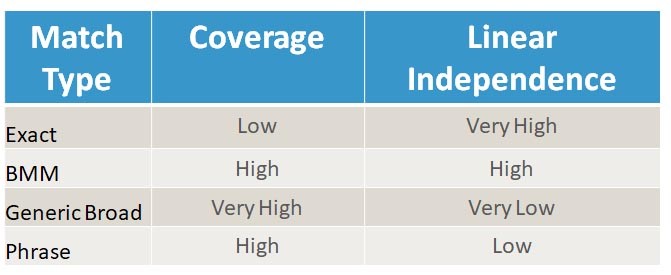
There are two major concepts on selecting keyword match type, coverage and linear independence.

Coverage is the ability of having a small set of keywords that cover an important amount of user search queries of the interested category you compete in. Coverage is lowest with Exact match as the probability to match a certain user search query is lower than other types of matches. In the other extreme, the Generic Broad has the highest coverage. However, this high coverage comes at a price. A very steep price indeed as you will see below, the price is low independence.

Linear independence is the ability for one keyword of behaving independently of other keywords in the same account. We can think of it as low interdependence or low cannibalization of searches between each keyword. For those of you that remember some algebra, it is similar to the concept of avoiding the co-linearity of vectors. Now, keywords and semantic objects are not vectors. However, organizing an account as clean as possible is the first step to been able to optimize the account in the future through keyword bidding.

Why then do broad generic keywords have low independence? And why should it matter? There two main problems with broad generic keywords:

1) Not all the keywords needed to be present in the query to activate the match. What we call the partial match.

2) Google allows the use of synonyms on broad generic.

This generates many search queries that may not be aligned to your business offerings or there is a lost opportunity of handling a generic keyword as a mixed bag of intentions. Let’s take one example from the auto industry. One might say that the adjective “used” car and “pre-owned” car means the same and Google might interpret them as synonyms. However, I can tell you from experience that keywords +used +car and +pre +owned +car do not behave the same. For a used car classifieds site, generally, the “pre-owned” term usually has a higher conversion rate. Because of this conversion rate difference, it is important to have these terms separated using BMM structure instead of a generic match type. This will allow to bid separately for each term optimizing the account better.

So remember, every time you use a generic broad match a SEM fairy dies. Joking aside, I recommend using a mix of 5%/10% exact match keywords and 90%/95% BMM keywords.

Think about building a good structure and keyword base for account optimization through keyword bidding.

Happy bidding.

Google-position

What Google doesn’t want you to know about average position

An oldie but good one. Originally published in 2015.

The average position myth

A common phrase that I have heard about average position is the closer to the top of the page the better. I have even heard that the 1st ad position should be coveted by digital marketers specially on the branding benefits. The proliferation of this myth leaves me baffled.

I wanted to shed some light and some humble evidence to contradict this point. That first position isn’t the best position SERP for a performance oriented account. Insteat a target position between 2 and 3 stands what I would call a performance “sweet-spot”. 

Average CTR vs. Average Position

Above shows a graph of accumulated information on a high volume (clicks & conversions) ad group. We will later see it is representative of other ad groups that show similar conclusions. The graph was generated with information of 12 month window. Each of the ad groups analyzed were composed of highly homogeneous keywords and high percentage of ad group traffic was consolidated in a few exact terms.

The graph was generated aggregating daily reports by average position cluster. Within the analyzed time period competitive structure was stable and no major changes were made to the ad group just bidding CPC price updates. 

The X-axis represents the average position cluster, the Y-axis on the left shows average CTR.

Nothing mind-blowing here, CTR generally decrease with an increase of average position. Now (below) we add an overlay of data points with their average CPC (right Y-axis)

Average CPC vs. Average Position

Average CPC declines as well, the closer the position to 1.0 the more expensive it is. Again, no major news.

From this point on, it gets more interesting, let’s dive deeper on the CTR and CPC curves. 

CTR Linear Fit

In this example a linear regression for the CTR curve offers a good fit (R^2=71%)

CPC Exponential Fit

However, the CPC curve has a better fit with an exponential curve (R^2 = 86%). This type of curve shows that CPC has an accelerated decay or accelerated increase, depending if you move left or right within the graph.. 

Finding the sweet-spot

Considering that the conversion rate is stable within the same ad group and independent of average position, then CPC and Cost Per Acquisition (CPA) go hand in hand. 

We can see an area where CTR is stable and CPC has local minimum, behold, our sweet-spot. Let’s call this area the Efficient Position Area (EPA, environmental pun intended). 

As we can see from the graph, as we move to the left of the area, CTR does not increase much however average CPC (also conversion cost) increases dramatically without any significant gain in volume. On the other side, moving to the right, CTR has a significant drop as we get close and cross the 3.0 average position barrier. This decline in click volume is seen across many ad groups. I can be related to going from top ads to sidebar ads in the SERPs.

Conclusion

Optimizing bids taking into account ad position within efficient area can generate savings that can be used to invest in other keywords/adgroups lowering overall CPA of global account. 

So try making this analytic exercise with your own adwords account, let me know through comments if you find similar findings.